
In Brief: Easier Debugging of CDN Setups with TYPO3
Does this sound familiar? A website is running behind a CDN or reverse proxy, and at some point someone says, “But I’m getting the wrong IP address.” Then the search begins: checking headers in the access log, recreating the request with `curl`, sifting through TYPO3’s proxy configuration, and wondering which address TYPO3 actually considers to be the client IP in the end.
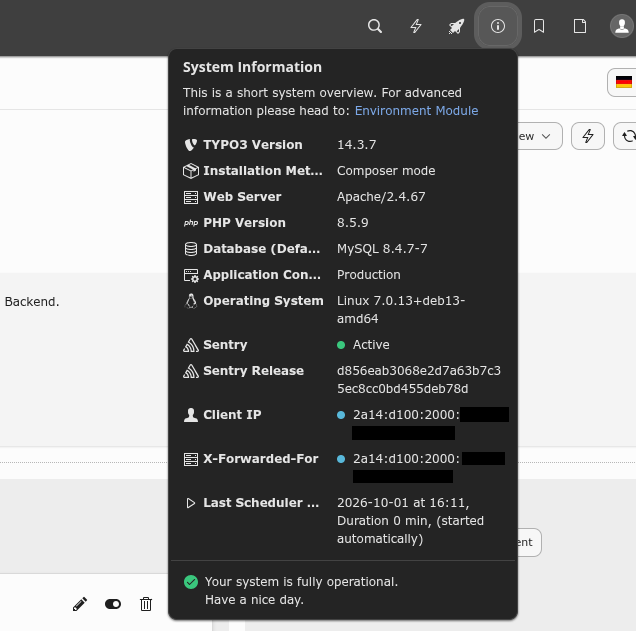
That's exactly why I built a small extension: mfd/cdn-utils. It displays directly in the TYPO3 backend which client IP TYPO3 has detected and which proxies were involved in the request, according to the X-Forwarded-For header.
The topic: Phirewall in our projects
This extension was developed in response to a specific project need: We began integrating Phirewall and the associated TYPO3 extension, flowd/typo3-firewall, into our projects. Phirewall is an application firewall written in PHP that operates as PSR-15 middleware. It offers whitelists and blacklists, rate limiting, and Fail2Ban-style temporary blocks.
The TYPO3 extension integrates this into TYPO3: The rules are maintained in a PHP file located at config/system/phirewall.php. In addition, there is a backend module that allows you to manage simple blocking patterns (IP, CIDR, path, header, regex), as well as support for the OWASP ModSecurity Core Rule Set. This ensures that unwanted requests are blocked before TYPO3 begins the resource-intensive processing.
As useful as this is, there is one prerequisite on which everything depends: Many rules rely on the client IP, such as “a maximum of ten requests in ten seconds per IP” or “temporarily block an IP after repeated misconduct.” By default, the extension retrieves the client IP from TYPO3 via the core mechanism that takes the reverse proxy configuration into account. Whether the firewall functions properly therefore depends directly on TYPO3 knowing the correct addresses.
When using a CDN, there are two common types of errors:
- TYPO3 sees the CDN's IP address for all visitors. As a result, all visitors share a single counter. The rate limit is quickly reached, and in the worst-case scenario, a Fail2Ban rule blocks the proxy—and thus all visitors—at once.
- TYPO3 trusts a header that it shouldn't. This allows any client to specify arbitrary sender addresses using a forged
X-Forwarded-Forheader. Rate limits can be bypassed this way, and in extreme cases, third-party addresses end up on the blocklist.
So before we write firewall rules, let's make sure that TYPO3 is using the correct client IP addresses. This is exactly the kind of check that cdn-utils is designed to simplify.
Why Debugging behind a CDN is so tedious
As soon as a CDN or reverse proxy is positioned in front of TYPO3, the web server initially sees only the proxy as the sender. If everything is configured correctly, the actual visitor’s address is included in the X-Forwarded-For header. Each additional proxy along the way appends its own address, creating an entire chain.
TYPO3 can evaluate this information. Using the reverseProxyIP and reverseProxyHeaderMultiValue settings in $GLOBALS['TYPO3_CONF_VARS']['SYS'], you can specify which proxies are trusted and which entry in the chain is considered the client IP. However, it’s not immediately obvious whether the result is correct. And since any client can freely include the X-Forwarded-For header, blindly trusting it is not a solution either. 😉
Even checking the access logs doesn’t always help. They’re only meaningful if the web server correctly parses the proxy headers, because the client IP listed there depends entirely on the server’s configuration. TYPO3 can’t verify whether that’s the case: The application only sees what the web server passes on to it and knows nothing about what the server itself writes to the log. A log entry showing the proxy's IP address instead of the visitor's could just as easily be caused by a configuration issue in the web server as one in TYPO3.
The solution: Client IP and proxy chain in System Information
This extension adds two entries to the system information in the TYPO3 backend toolbar:
- Client IP: The address that TYPO3 identifies as the source of the request after evaluating the reverse proxy configuration.
- X-Forwarded-For: The string of addresses from the header of the same name, separated by arrows. If the header is missing, “none” appears there.
This allows you to check at a glance whether the proxy configuration is working: Does the displayed client IP match your own public address? Does the proxy chain appear as expected? What previously required access logs or temporary debug code is now visible in the backend. The extension merely displays this information and does not alter TYPO3’s behavior in any way.
Installation and Prerequisites
The extension supports TYPO3 13.4 LTS and TYPO3 14, requires no additional packages other than the TYPO3 core, and is licensed under the GPL. The package is available on Packagist, and the source code is hosted in Marketing Factory's GitHub repository. Here's how to install it using Composer:
composer require mfd/cdn-utilsAfter installation, the two new entries will appear in the System Information section of the backend toolbar without requiring any further configuration.
Verdict
It’s not a major breakthrough, but it’s exactly the kind of tool that saves time in everyday use: If you run TYPO3 behind a CDN, you can now see at a glance what happens to the IP address as it travels from the visitor to the application. To learn how we use CDNs in our projects, visit our page on Content Delivery Networks; you can find additional extensions under Our TYPO3 Extensions.
Feedback, issues, and pull requests are always welcome in the repository.
Please feel free to share this article.
Comments
No comments yet.