Current TYPO3 Versions
TYPO3 Versions with Official Long Term Support
TYPO3 Long Term Support (LTS) versions come out-of-the-box with 3 years of official support, so you don't have to worry about maintenance and security updates during this period. Marketing Factory always builds new customer projects on the basis of the latest TYPO3 LTS version: At this time, this list includes the following versions.
TYPO3 Version 14.3 LTS – Modern Backend and Greater Editor Efficiency
TYPO3 Version 14 LTS – Modern Backend and Greater Editor Efficiency
On 21 April 2026, TYPO3 version 14 LTS was released under the claim “The One”. It is the first major release since TYPO3 v13 and brings the most significant backend redesign in TYPO3 history. The focus is on a modernised editor interface, noticeable performance improvements and deeper accessibility support.
TYPO3 v14 LTS will receive free community support until 30 June 2029. Extended Long Term Support (ELTS) is available until 30 June 2032.
System requirements:
- PHP 8.2, 8.3, 8.4, 8.5
- MariaDB 10.4.3+ / MySQL 8.0.17+ / PostgreSQL 10.0+ / SQLite 3.8.3+
What's new in TYPO3 v14?
TYPO3 v14 LTS delivers the most comprehensive backend redesign in the history of the CMS. The new “Fresh” theme modernises the interface from the ground up – with a fixed editing panel on the right that makes working noticeably more fluid for editors. Recently used content elements are immediately available in the wizard, field validation happens in real time, and the translation workflow has been fundamentally simplified for multilingual projects.
In addition, v14 introduces a built-in QR code generator, individually configurable dashboard widgets and accessible forms that meet the requirements of the BFSG significantly better. The complete removal of jQuery from EXT:form also improves frontend performance.
TYPO3 Version 14 LTS - What's new
New backend design with context panel
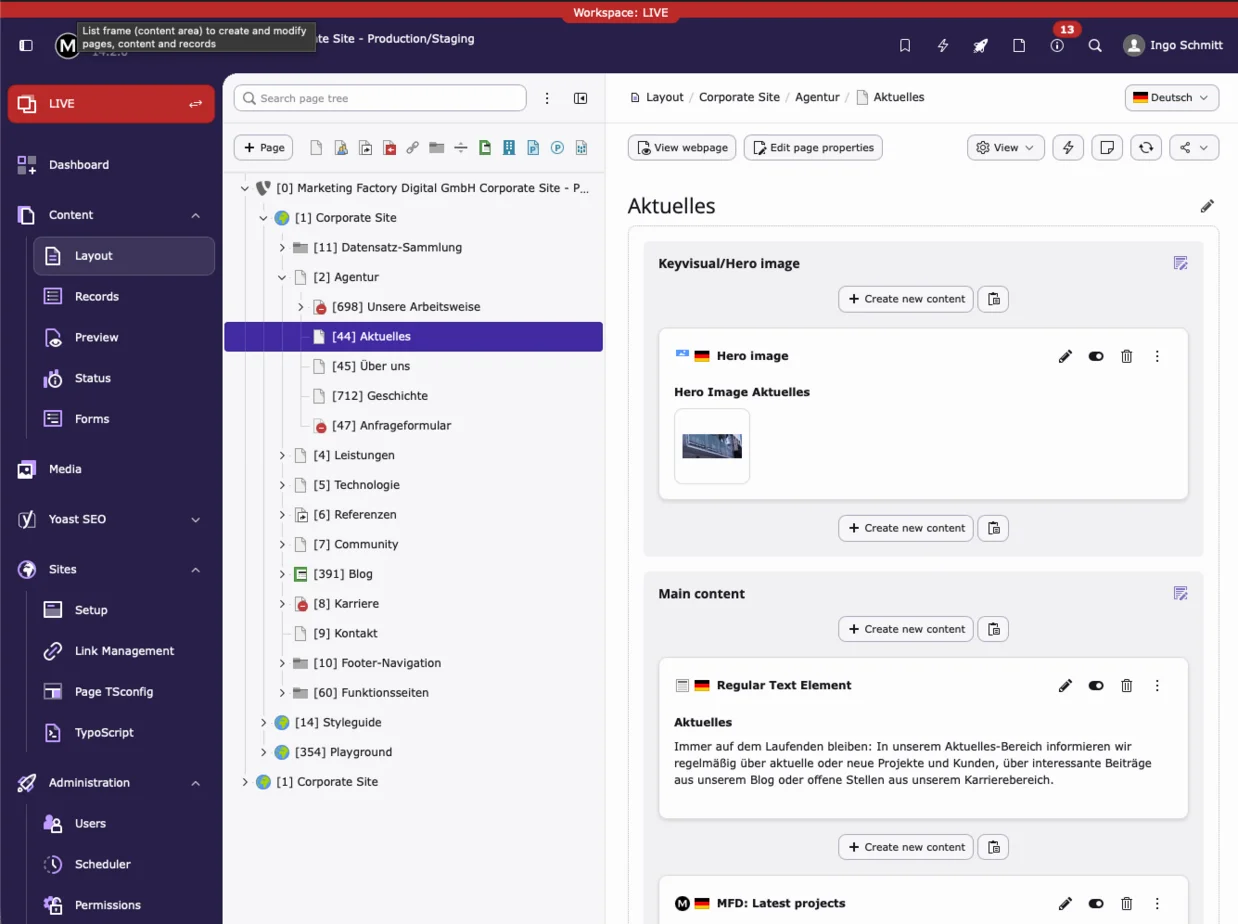
The TYPO3 v14 backend, named “Fresh”, has been redesigned from the ground up. The most noticeable change for editors: Instead of reloading the entire view, a context panel slides in from the right. The editing form opens directly alongside the page layout, which remains visible in the background. Editors always keep sight of where they are working, navigate less and get things done faster.
Recently used content elements for faster editing
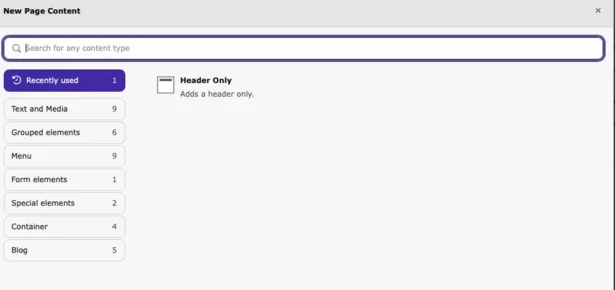
The content element wizard now shows recently used element types at the top. Editors who regularly insert the same elements save several clicks per operation – a noticeable difference during more extensive page work.
Guided translation workflow with multi-language selection
The translation workflow in the backend has been fundamentally reworked. Editors can now select and compare multiple languages simultaneously, significantly reducing the effort involved in multilingual projects – previously a separate step was required for each language.
Inline field validation while typing
In TYPO3 v14, validation errors in form fields are shown immediately as you type – no longer only after saving. This saves editors time and prevents having to save incomplete records just to see validation messages.
Individually configurable dashboard widgets
Dashboard widgets in TYPO3 v14 can be configured on a per-user basis. New widgets include personal bookmarks, open documents and recent logins. Particularly in larger editorial teams, the dashboard now provides a genuinely useful overview rather than a generic starting screen.
QR code generator and short URL built into the backend
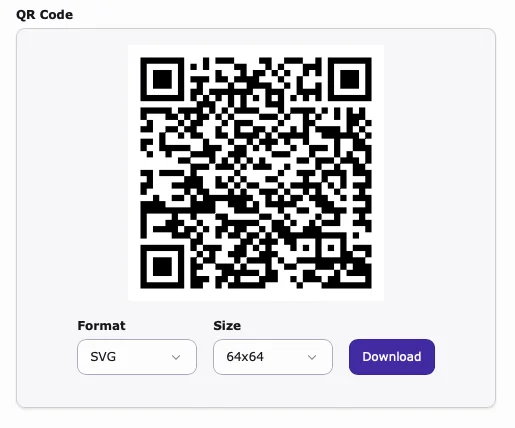
TYPO3 v14 includes a built-in QR code generator and short URL functionality directly in the backend. QR codes can be generated for any page or content element and used for print materials or events – without any third-party tools.
Accessible forms and better frontend performance
EXT:form has been comprehensively optimised for accessibility in TYPO3 v14. Forms now meet WCAG requirements significantly better – relevant for all websites subject to the German Accessibility Strengthening Act (BFSG). At the same time, jQuery has been fully removed from EXT:form, delivering a noticeable improvement in frontend loading times and overall performance.
New “Link” page type for more flexible navigation
With the new “Link” page type, TYPO3 v14 replaces the former “External URL” type. The new type supports not only external URLs but also phone numbers and email addresses as direct navigation targets. This considerably simplifies the maintenance of contact pages and navigation structures.
Guided wizard for creating new pages
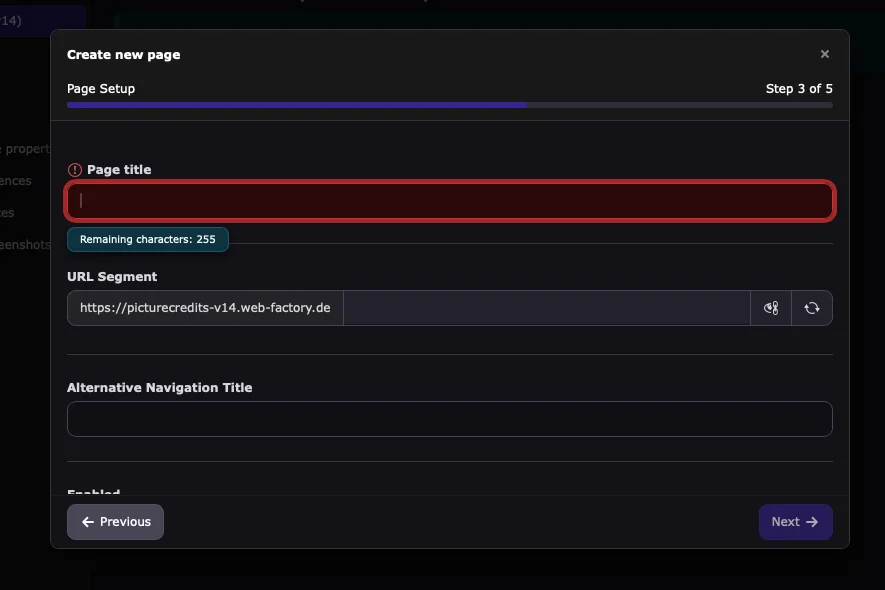
Creating new pages in TYPO3 v14 is significantly more intuitive. An improved wizard guides editors step by step through the process, keeping all relevant input fields visible throughout. This reduces errors when setting up new pages and gives less experienced editors the confidence that nothing important has been missed.
Centralised bookmark manager
Bookmarks in TYPO3 v14 can now be organised into groups. Administrators can also define global bookmarks available to all users. This helps editors find the areas they need to work in more quickly. Global bookmarks can also be used purposefully to link directly from an editorial guide into the right place in the backend, so editors get to exactly where they need to be in a single click.
Guided wizard for creating new pages
Creating new pages in TYPO3 v14 is significantly more intuitive. An improved wizard guides editors step by step through the process, keeping all relevant input fields visible throughout. This reduces errors when setting up new pages and gives less experienced editors the confidence that nothing important has been missed.
Centralised bookmark manager
Bookmarks in TYPO3 v14 can now be organised into groups. Administrators can also define global bookmarks available to all users. This helps editors find the areas they need to work in more quickly. Global bookmarks can also be used purposefully to link directly from an editorial guide into the right place in the backend, so editors get to exactly where they need to be in a single click.
TYPO3 Version 13.4 LTS – Focus on Usability and Performance
In October 2024, the latest TYPO3 version 13.4 LTS (Long Term Support) was released under the claim “Ride the Wave.”
Long Term Support means that this version is actively maintained and regularly updated by the TYPO3 community. These updates include both functional improvements and important security patches. The regular maintenance phase runs until December 31, 2027.
After that, an Extended Long Term Support (ELTS) period can be purchased for an additional three years, which means: official support for TYPO3 v13 will finally end on December 31, 2030.
What’s new in TYPO3 v13 LTS?
TYPO3 v13 continues the ongoing modernization of the system. The backend has been further refined to deliver a cleaner, faster, and more accessible user experience. New features include a right-to-left interface for languages such as Arabic and Hebrew, as well as a Dark Mode for the TYPO3 backend.
Numerous core optimizations further improve the system’s overall performance.
With PHP 8.2 as the new minimum requirement, TYPO3 v13 benefits from modern language features and significantly enhanced runtime performance – a clear step toward greater efficiency and long-term sustainability.
Faster Page Tree and Drag-and-Drop Support
The page tree is a central element of the TYPO3 backend and typically reflects a website’s navigation structure. In version 13, it has been re-implemented as a reactive page tree, offering smoother rendering, native drag-and-drop functionality, optimized API endpoints, and the use of local browser storage for improved performance and usability.
Right-to-Left Backend
Editors can now use the TYPO3 backend in right-to-left (RTL) languages such as Arabic, Hebrew, Kurdish (Sorani), Persian (Farsi), Urdu, Kashmiri, and Pashto. This enhancement facilitates international collaboration in global organizations and enables local language versions of a website to be created more efficiently with the help of native speakers.
Dark Mode in the TYPO3 Backend
With the new Dark Mode, the TYPO3 backend introduces a modern, high-contrast interface that not only looks stylish but also reduces eye strain. This is especially important when working in low-light environments. Editors can customize their experience and choose whether the system automatically switches between light and dark themes based on the time of day or personal preference.
Support for Modern Image Formats
TYPO3 now natively supports modern image formats such as WebP and AVIF — delivering better performance while maintaining excellent image quality.
In addition, SVG graphics can now be cropped directly in the backend or via Fluid ViewHelpers. TYPO3 processes these images natively as SVG files instead of converting them to PNG or JPG, saving storage space and ensuring crisp, high-quality visuals on all devices.
Site Sets for Multi-Domain Websites
With Site Sets, TYPO3 introduces a modern concept for managing website configurations. All relevant settings are bundled in a single, centralized set that can be easily extended or reused. This is making multi-domain projects more structured and efficient. A new, intuitive backend interface allows editors and developers to adjust, override, and apply default settings across projects with ease.
TYPO3 Version 12.4 LTS – Focus on Security and Usability
TYPO3 version 12.4 with Long-Term Support (LTS) was launched in April 2023 with the slogan "Here To Save The Day". Long-Term Support means that this version will be further developed by the TYPO3 community and regularly updated. These updates will include technical enhancements and security patches. The regular maintenance phase will run until April 30, 2026.
After this period, Long-Term Support will be offered for version 12.3 LTS, which can be extended for up to 3 years – this will end on April 30, 2029.
What's new in version 12.4 LTS?
Once again, the user interface of the TYPO3 backend has been modernized in many places and designed to be more intuitive. It also introduces new features for improved security of users and the system.
With PHP 8.1 as the new minimum requirement for TYPO3 v12, not only new possibilities in development are available. The current PHP versions also significantly increase the performance of TYPO3.
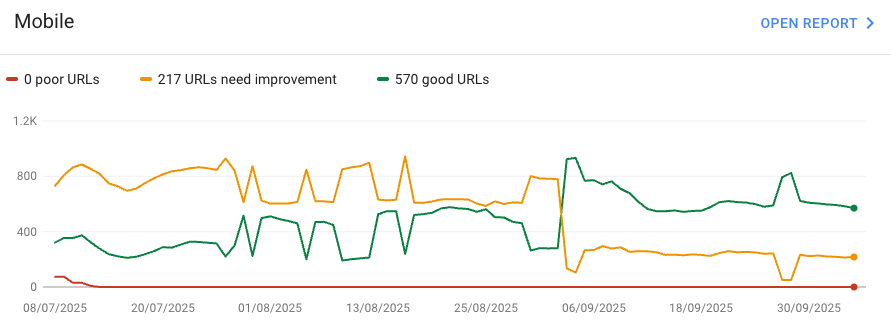
In addition, the improved rendering significantly enhances the website’s mobile performance. The chart illustrates the improvement in Core Web Vitals we measured after upgrading to TYPO3 v12.
More comfort in the file list
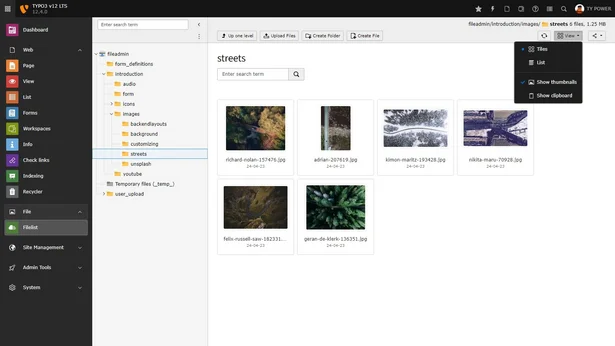
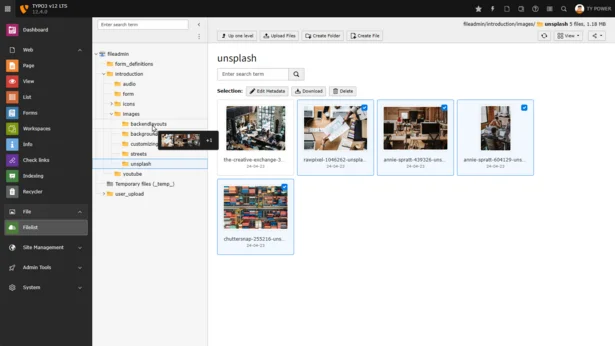
In the file list, your editors can now quickly and conveniently switch between a list and a tile view. The new tile view offers significantly larger preview images and a clearer presentation by dispensing with technical details.
In addition, you can now drag and drop files and folders in the file list to other folders.
Improved live search in the TYPO3 backend
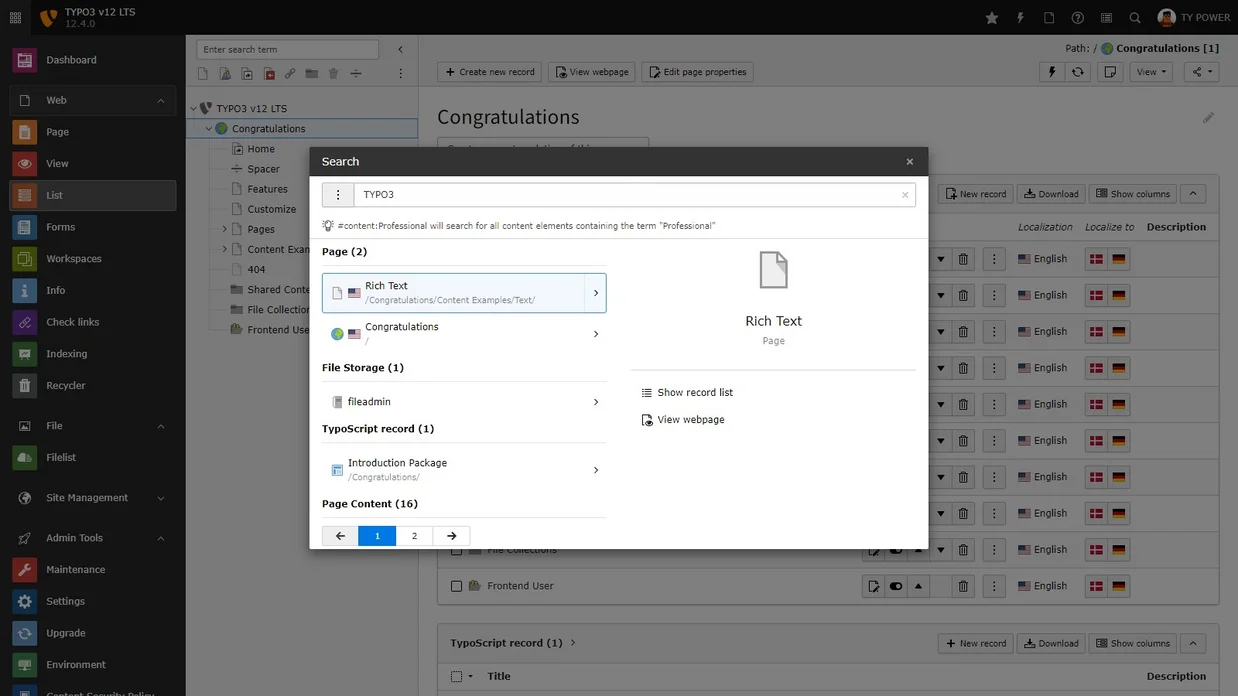
The search functionality in the backend is now displayed in a separate window (modal). Here, the search results are displayed as soon as you enter the search term. The results are grouped by type and can also be filtered.
Depending on the record type, you can open the results for editing, display them in the list view or view them in the frontend.
New password policies
TYPO3 now has configurable password policies for both backend and frontend users. By default, at least 8 characters with at least one digit, one capital letter and one special character are required.
Not only can these guidelines be customized, but they can also be supplemented with custom rules - for example, with a password blacklist.
Strong security standards thanks to Content-Security-Policy
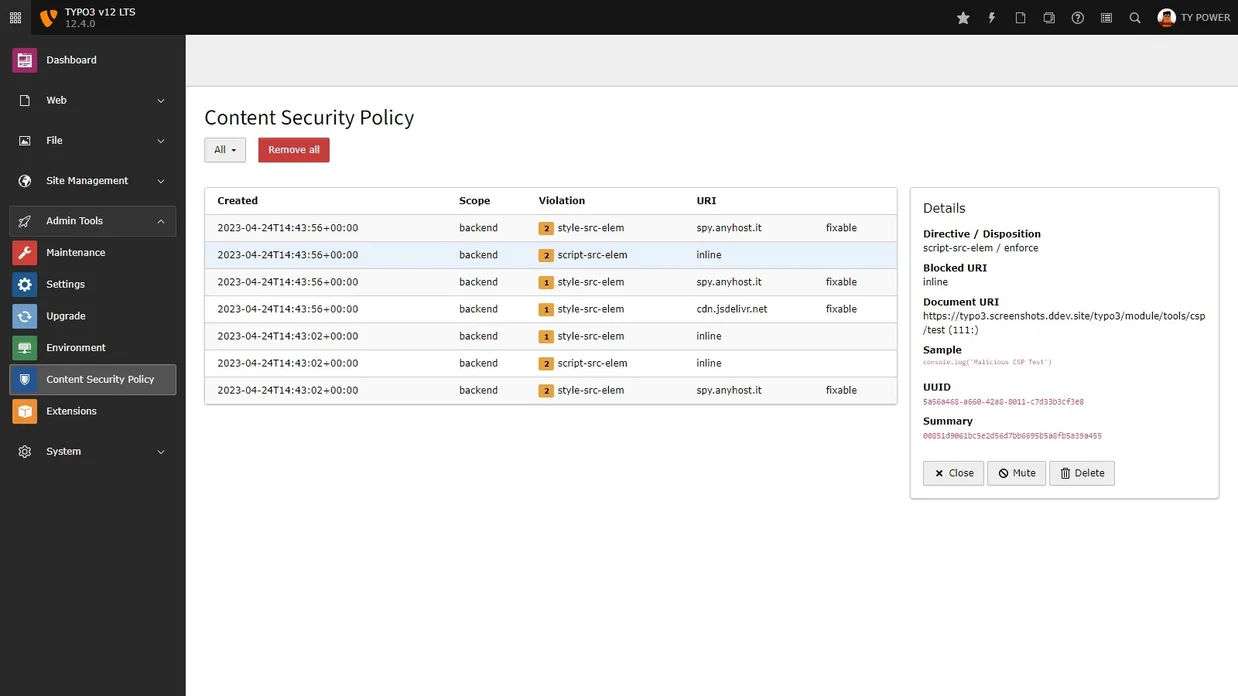
The HTTP header Content-Security-Policy (CSP) can protect your website visitors from Cross-Site Scripting and Data Injection attacks. The web browser will only load the content (e.g. scripts) defined in the CSP. All other content from potentially unsafe sources is effectively blocked.
TYPO3 v12 includes a flexible policy builder for this purpose, both for the basic configuration of the CSP and to modify it through extensions when required. Besides the frontend of your website(s), the TYPO3 backend is also protected by a CSP. Violations of any CSP are listed in a new backend module where they can be reviewed.
Standardized integration of HTTP webhooks
TYPO3 now offers a unified solution for incoming and outgoing webhooks. This simplifies communication with third-party systems. A simple practical example: when the contents of an external product database are imported into TYPO3 and output, the relevant caches in TYPO3 can be automatically flushed when changes are made in the external system.
Your TYPO3 upgrade – planned and without surprises
Whether you are planning an upgrade to v14, deciding between an upgrade and a relaunch, or looking to move towards a continuous upgrading approach, the key is to plan ahead.
TYPO3 upgrades are rarely just technical tasks. They affect extensions, integrations and editorial workflows.
Our approach is continuous upgrading:
- Smaller, manageable updates instead of large one time projects
- No long system freezes
- Ongoing improvements as part of regular development
This keeps your TYPO3 installation up to date without introducing unnecessary risk or unexpected costs. Learn more about Continuous Upgrading
Frequently asked questions about TYPO3 versions and upgrades
Which TYPO3 version should I choose for a new project?
We recommend starting with the latest LTS version, currently TYPO3 v14, to ensure long-term support and access to the latest features.
Do I need to update my existing TYPO3 installation to v14?
Not immediately. The right timing depends on your current version, extensions and business requirements. Those still running v13 or v12 are well positioned for now. Anyone on older versions should act before support ends and security vulnerabilities remain unpatched.
What is the difference between a TYPO3 upgrade and a relaunch?
An upgrade updates the technical foundation of the existing system. Content, design and structure remain intact. A relaunch is a fresh start: new concept, new design, new structure, often combined with an upgrade. An upgrade is generally much faster and more cost-effective. A relaunch makes sense when the existing system no longer meets content or design requirements. We help determine the right approach for each situation. Read more.
How complex is an upgrade from v12 or v13 to v14?
This depends on your setup, especially custom extensions and integrations. Most projects benefit from a structured upgrade strategy. We assess this upfront and provide a realistic estimate with no unpleasant surprises.
What happens when my TYPO3 version reaches end of free support?
Security updates stop. Running such a system increases risk, both technically and legally, for example with regard to GDPR compliance. Anyone unable to upgrade immediately should at least consider Extended Long Term Support (ELTS) as a bridging solution.
What is Extended Long Term Support (ELTS) and is it worth it?
ELTS extends support beyond the regular lifecycle and can be useful as a temporary bridge. It is not a long-term strategy however. The platform continues to fall behind, and the effort required for a later upgrade increases over time.
We are still running TYPO3 v11 or older – what should we do?
You should plan an upgrade as soon as possible. Older versions are no longer supported and pose increasing risks. The later an upgrade is carried out, the more effort it involves with each version skipped.