
ai_filemetadata: Automatically Generate Alt Texts for TYPO3 – BFSG-Compliant and Multilingual
AI-generated alt texts for TYPO3 that genuinely help screen reader users – not an SEO tool, but real accessibility
The problem: missing or insufficient alt texts exclude people with visual impairments from key information.
In many cases, images are assigned no alt text at all, or only rudimentary, SEO-driven descriptions. This falls short of what people using screen readers actually need. A meaningful description of the image content is essential – and under the European Accessibility Act (EAA), it is also a legal requirement for many websites and online shops. Missing or inadequate alt texts can affect usability and carry legal consequences.
Writing alt texts is typically the responsibility of editors. But crafting a proper description for every single image in a CMS is time-consuming and ties up resources that are rarely available at scale.
Our solution
With the TYPO3 extension ai_filemetadata, we offer a practical solution: the extension uses AI services to analyze image content and generate alt text suggestions. These can be accepted by editors as-is or adjusted where needed, significantly reducing the effort involved.
The focus is not on short, keyword-driven SEO texts, but on meaningful descriptions that screen readers can actually use.
The extension is not tied to a single provider: it works with OpenAI, with Mittwald’s AI hosting, and with locally hosted models, as long as they offer an OpenAI-compatible API. This gives you full control over which service you use.
How it works
The extension analyzes images automatically and generates detailed, descriptive alt texts that convey the image content as clearly as possible. These texts are designed to make visual content accessible to users who cannot see the images.
Multilingual content
Alt texts are generated separately for each language – not simply translated. Because the AI describes the image fresh in each language, the results are more natural and better suited to each audience than a mechanical translation would be.
Features of the ai_filemetadata extension
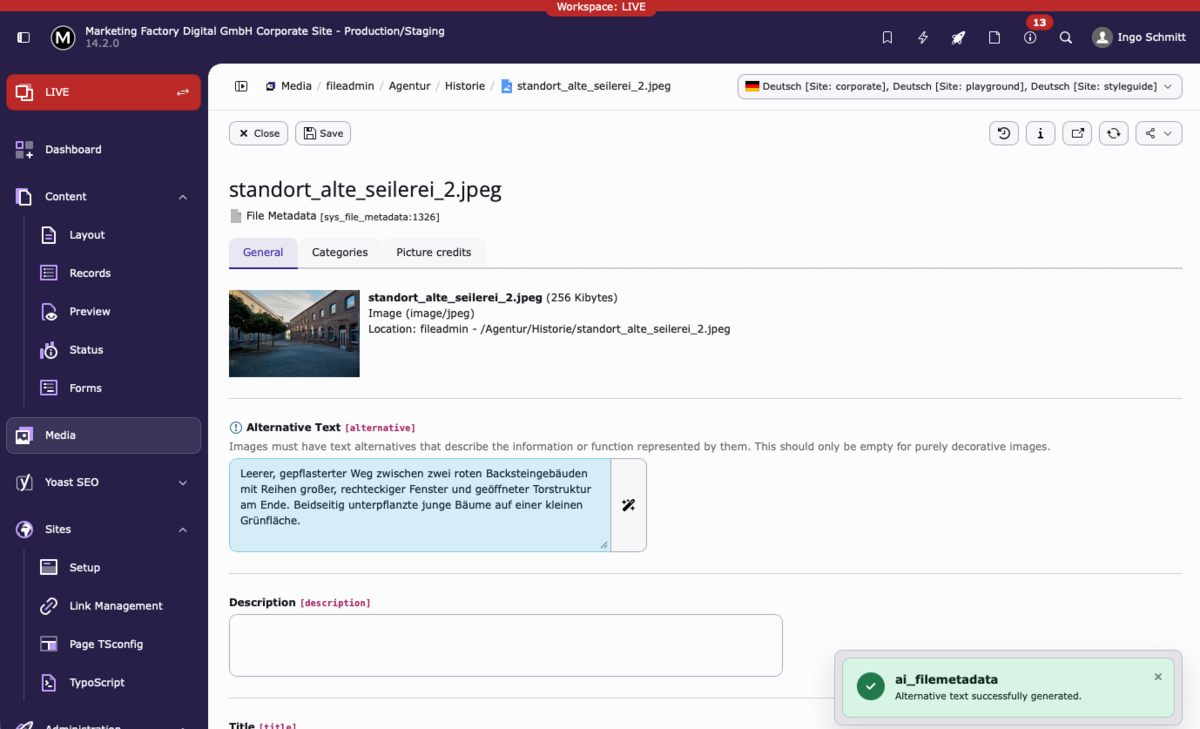
The extension is open source and compatible with TYPO3 version 12 and above (PHP 8.2), including TYPO3 v14.
Seamless integration:
- Generate alt texts directly in the TYPO3 Filelist module.
- Automatically generate alt texts when new images are uploaded.
- Option to manually create or adjust alt texts in the FAL module.
- Automated generation of alt texts for an existing image library via CLI command.
Multilingual: Supports all active languages in the TYPO3 instance.
Editor-friendly: Generated alt texts can be overwritten at any time.
API usage: An OpenAI-compatible API and API key are required. Costs are minimal – in our tests, processing 100 images came to less than one euro.
Data privacy: For image analysis, images are transmitted to the selected AI service. When choosing a provider, its privacy policy and the license terms of the images used should be carefully reviewed.
In Use
We run the extension on marketing-factory.com ourselves and have integrated it at SEGGER. With close to 20,000 downloads in the TYPO3 Extension Repository, it is also used by a growing number of TYPO3 projects worldwide.
Contribute and suggest features
The extension is under active development. Anyone who wants to suggest new features or contribute to the project will find all open topics in the issue tracker on GitHub.
Link List for the TYPO3 Extension "ai_filemetadata"
- Official Documentation
- Source Code Repository
- Paket at Packagist
- Extension-Download in TYPO3 Extensions Repository
- Issue-tracker
- Review of the Extension from Wolfgang Wagner (in German)
- Blog article: What is the right alt text for which images?
- Blog article: Using Our TYPO3 Extension ai_filemetadata with Mittwald’s AI Hosting
Accessibility for Your TYPO3 Website
[Translate to English:] Die automatische Generierung von Alt-Texten ist ein wichtiger Baustein für barrierefreie Webseiten, aber nur einer von vielen. Das Barrierefreiheitsstärkungsgesetz (BFSG) stellt weitreichendere Anforderungen an Webseiten und Online-Shops.
Wir begleiten TYPO3-Projekte von der Analyse bestehender Barrieren bis zur vollständigen Umsetzung: technisch, redaktionell und nachhaltig. Das umfasst sowohl die initiale Aufarbeitung bestehender Bildbestände per Batch-Verarbeitung als auch den Aufbau eines dauerhaften Redaktionsprozesses, der sicherstellt, dass neue Bilder von Anfang an korrekt gepflegt werden. Sprechen Sie uns an, wir helfen Ihnen, Ihre TYPO3-Website BFSG-konform zu gestalten.
Use the extension for free
ai_filemetadata is open source and available in the TYPO3 Extension Repository. Composer installation, documentation and the issue tracker are all available on GitHub.
Alt texts as a project – we take care of it
Large image libraries, multilingual instances, ongoing editorial processes: we analyse the existing inventory, select the right AI service, set up the extension, process the backlog and establish a workflow that works long-term.
This includes:
- Inventory analysis (number of images, missing alt texts, languages covered)
- Selection and integration of the AI provider (OpenAI, Mittwald AI Hosting or self-hosted models)
- Setup and configuration
- Batch processing of the existing image library
- Editor documentation
- Optional ongoing support
Frequently Asked Questions
What does the TYPO3 extension ai_filemetadata do?
The extension analyzes images in the TYPO3 file manager using an AI-powered Vision API and generates descriptive alternative texts from them. These suggestions appear directly in the Filelist module of the TYPO3 backend and can be accepted or adjusted by editors. The extension is explicitly designed for accessibility, not for SEO purposes.
Which TYPO3 versions are supported?
The extension supports TYPO3 version 12 and above, including TYPO3 v14, and requires PHP 8.2. It is available in the official TYPO3 Extension Repository (TER) and can be installed via Packagist using composer require mfd/ai-filemetadata.
Is ai_filemetadata free to use?
The extension itself is open source and free of charge. However, generating alt texts requires an API key from an OpenAI-compatible service, which incurs costs. In practice, these costs are minimal: in our own tests, we paid less than one euro for 100 images.
Where is the extension already in use?
We use ai_filemetadata on marketing-factory.com itself and have integrated it into the SEGGER project. With nearly 20,000 downloads in the TYPO3 Extension Repository, it is also being adopted by a growing number of other TYPO3 projects worldwide.
Why are correct alt texts a legal requirement?
The European Accessibility Act (EU Directive 2019/882), implemented in Germany as the Barrierefreiheitsstärkungsgesetz (BFSG), requires operators of many websites and online shops to make their digital services accessible. Missing or inadequate alt texts are considered a barrier for visually impaired users and can lead to legal consequences.
Are SEO alt texts sufficient for accessibility?
No. SEO alt texts typically contain keywords but do not describe the actual image content. Accessibility requires a precise description of what is shown in the image, so that screen reader users can fully understand the visual context. ai_filemetadata is explicitly designed to generate this type of descriptive alt text.
Which image types require special attention when writing alt texts?
The WCAG guidelines distinguish between informative images, which require a descriptive alt text, decorative images, which should have an empty alt attribute, and functional images such as icons or buttons, where the function rather than the appearance is described. ai_filemetadata is designed for informative images. Automatic detection of decorative images is planned as a future feature.
For a detailed overview, see our blog post: BFSG: What is the right alt text for which images?
Which AI service does the extension use, and can it be replaced?
By default, the extension uses the OpenAI Vision API with the gpt-4o-mini model. However, it can be configured to work with any OpenAI-compatible API endpoint, such as Mittwald's AI hosting or other self-hosted models.
Does the extension work for multilingual websites?
Yes. ai_filemetadata supports all active languages configured in a TYPO3 instance. Alt texts are generated separately for each language. A folder-based language mapping in system/settings.php allows you to define which languages apply to specific storage folders.
Can I customize the AI prompt for alt text generation?
Yes. The prompt sent to the AI model can be customized in the extension configuration under Alt Text Prompt, for example to adjust the tone, language style, or length of the generated texts. Configuration is done under Admin Tools > Settings > Extension Configuration.
Are large images transmitted to the API in full?
Not necessarily. The extension offers optional image resizing before transmission. Since a resolution of 512x512 pixels is sufficient for image analysis in most cases, this significantly reduces the number of tokens processed and therefore the API costs.
Note: Resizing is performed at runtime by TYPO3. With large image collections or high-resolution originals, this can lead to noticeably longer processing times and increased server load. It is advisable to test this option with a limited number of images before rolling it out in production.
Can alt texts be generated in bulk for existing images?
Yes. The extension includes a CLI command that generates alt texts for all images within a given folder in a batch process:
bin/typo3 ai:generate-alt-texts --path="1:my-folder/" [--overwrite] [--limit=1]
The optional --overwrite flag replaces existing alt texts, while --limit restricts the number of images processed per run. This is especially useful when rolling out the extension on sites with an existing large image library.
Can I exclude certain folders from analysis?
Yes. Specific folder paths can be excluded from processing via system/settings.php. This is useful for directories containing sensitive content or images whose license terms prohibit processing by external AI services.
What happens to our images during analysis?
Images are transmitted to the configured external API service for analysis. Before using the extension, you should verify that this data transfer complies with your privacy policy. The same applies to image licenses: some license models explicitly prohibit the use of content for AI processing.
Can editors modify the generated alt texts?
Yes. The extension generates suggestions, not final texts. All generated alt texts can be edited or overwritten at any time in the TYPO3 backend. Editorial control remains entirely with your team.
How can I contribute to the development of the extension?
ai_filemetadata is an open source project and contributions are very welcome. The full source code is available on GitHub. Bug reports, feature requests, and pull requests can be submitted via the issue tracker. For commercial support or custom development, feel free to contact us directly.
How do I handle thousands of existing images that have no alt texts yet?
This is the typical starting point: a grown image library, thousands of files, few or no alt texts. A two-step approach works well here.
Step 1: Process the existing library via CLI. The extension's CLI command allows you to generate alt texts for all images in a folder in one batch run:
bin/typo3 ai:generate-alt-texts --path="1:my-folder/"
This can be done incrementally, folder by folder, adapted to the available time and server resources.
Step 2: Establish a sustainable editorial workflow. Ensuring that new images are consistently handled going forward requires more than a tool. We help build an editorial process within TYPO3 that ensures alt texts are systematically reviewed and approved, for example using workflow mechanisms in the TYPO3 backend.