
Why we are removing the Bootstrap Package from our projects
In the past, we have set up several client projects using the Bootstrap Package. Over the years, we have found that upgrades require significant time and effort.
We therefore decided back at the end of 2022 to no longer set up new websites with this extension. In recent weeks, I have removed the Bootstrap Package from two further TYPO3 installations.
tl;dr
We do not consider it beneficial to use the Bootstrap Package as the foundation for our own projects. It contains too many showcase features that are rarely used. New versions of the extension include changes that are in conflict with maintaining a stable project. The multiple layers of configuration and template inheritance increase the maintenance costs.
We do not question the Bootstrap Package itself; it is an important component of the TYPO3 ecosystem.
What is the Bootstrap Package?
The Bootstrap Package is a TYPO3 extension that provides a complete frontend theme based on the Bootstrap framework.
Among other things, it is:
- A showcase of the possibilities with TYPO3 CMS
- The technical foundation for the official TYPO3 Introduction Package
- A ready-to-use TYPO3 website that requires no profound developer knowledge
- A responsive frontend theme (as opposed to Fluid Styled Content)
Or, as described in its documentation:
The goal of this package is also to give an advanced example of how modern templating in TYPO3 CMS can be handled nicely without depending on third party extensions. Bootstrap Package comes with a fully configurable Frontend via TypoScript. This includes the TypoScript Constant Editor.
The passages I have highlighted already describe two of the issues I consider problematic when using this extension on a website. But let's first explain why we used the extension back then.
Why did we use the Bootstrap Package?
The Bootstrap Package served as the foundation for client projects because it is, without a doubt, a great extension.
The extension provides:
- A fully functional website template immediately after installation
- Many content elements based on Bootstrap (for example, Accordion, Slider, Card Group)
- Responsive image rendering that accounts for multi-column layouts in content elements, within container elements, and in page layout columns
- Many best practices for TYPO3 configurations
… and much more.
Each version of the Bootstrap Package supports two TYPO3 versions. It makes upgrading TYPO3 itself easier because it can be performed independently of the extension upgrade. But problems start as soon as the Bootstrap Package is upgraded for the first time.
What are the arguments against using the Bootstrap Package?
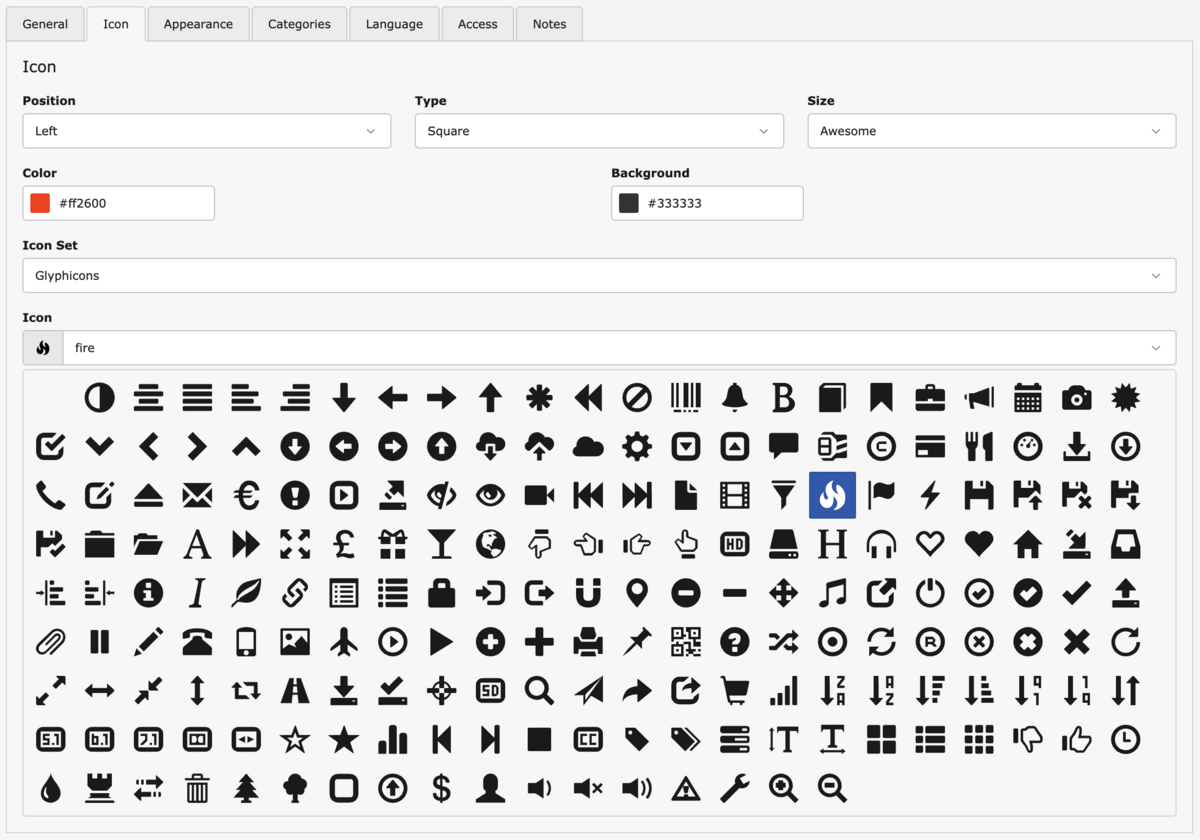
a) Too many showcase features
The extension definitely has a wide range of features. So let’s focus on icons here. Some websites use icons in their main navigation. Others may, for example, emphasize their services in the text with icons.
The Bootstrap package extends the page properties in TYPO3 and also provides several content elements, allowing you to display icons on the website in various ways:
- Icons in page properties
- Purpose: The display of the page icon can be controlled individually for the main navigation, subnavigation, breadcrumb, and footer navigation
- Options: Select an icon from the included “Glyphicons” or “Ionicons” icon sets, or use your own image from the file list
- Content element “Text & Icon”
- Purpose: The display of a single icon beside text
- Options:
- Icon from the icon sets or your own image from the file list
- Icon position
- Icon size
- Optional icon background (square or circle)
- When an icon background is selected: Color picker for icon and background colors
- Content element “Icon Group”
- Purpose: Text and icon, grouped in a grid
- Options:
- Icon from the icon sets or your own image from the file list
- Icon position
- Menu content elements "Cards" and “Cards of subpages”
- Purpose: The additional display of icons from the page properties in the menu element
Can you think of a project where you’d even come close to needing this wide range of options? Are there cases where an editor needs to be able to choose between round and square backgrounds for icons?
We’ve spent a great deal of time hiding unnecessary elements, fields, and options from backend users. However, unless you edit the templates, these options remain in the code. We’re burdened with CSS, HTML, and TypoScript for unused features.
b) Multiple inheritances in the frontend
The Bootstrap Package contains all configurations and frontend templates for the website and its content elements. Does it, really, contain everything? No—our own sitepackage includes overrides and additions for the client’s project.
This can quickly become confusing, especially if the TYPO3 installation includes multiple sites with different designs.
This leads to dependencies that might look like this:
Bootstrap Package → Global project settings in the sitepackage → Corporate Site Base → Corporate Site DE
Bootstrap Package → Global project settings in the sitepackage → Corporate Site Base → Corporate Site US
Bootstrap Package → Global project settings in the sitepackage → Affiliated company A
Bootstrap Package → Global project settings in the sitepackage → Affiliated company B
In addition, we customized many elements of the Bootstrap Package, both in styling and functionality, to meet the requirements of the client project. Even with patch releases of the extension, this repeatedly caused breaking changes in the output (which were caught by our automated tests).
c) The Bootstrap framework
When you use the Bootstrap Package, you inevitably end up using Bootstrap for styling. That, too, can create limitations.
Externally controlled upgrades: We keep all components of our clients’ projects up to date through Continuous Upgrading. This applies to web servers, TYPO3, and PHP packages, as well as to frontend components. However, when the Bootstrap Package removes support for Bootstrap 4 in a new version, I’m forced to adapt all templates for Bootstrap 5 during the upgrade. I want to choose that timing myself—which is only possible if I have full control over my frontend sources.
Unexpected changes to default values and styles: We reproduced the transition to Bootstrap 5 in the Bootstrap Package using its quite large commit. And found that this included several new default values and changes regarding the specificity of styles. Furthermore, some elements received a new design.
If the goal in your client project is to maintain the existing look—good luck.
Inheritances (again): The Bootstrap Package provides a parser that allows you to customize Bootstrap's SCSS variables using TypoScript constants (or, in recent versions, Site Settings). As an agency, we prefer to use our own build process and load only the components that are needed.
Since we need our own (S)CSS in any case to customize the website, this also results in multiple dependencies:
Bootstrap SCSS → Bootstrap Package SCSS → project-specific stylesBootstrap comes with a long list of SCSS variables. The Bootstrap Package overwrites some of them and adds its own. We customize both of these again and add our own. The same applies, of course, to the actual CSS rules. Sounds complicated? It is.
In many projects, we have now completely switched to custom code for our stylesheets. For our own website, this reduced the stylesheet file size from 351 KB to 108 KB. Eliminating inheritance and overrides has significantly improved maintainability.
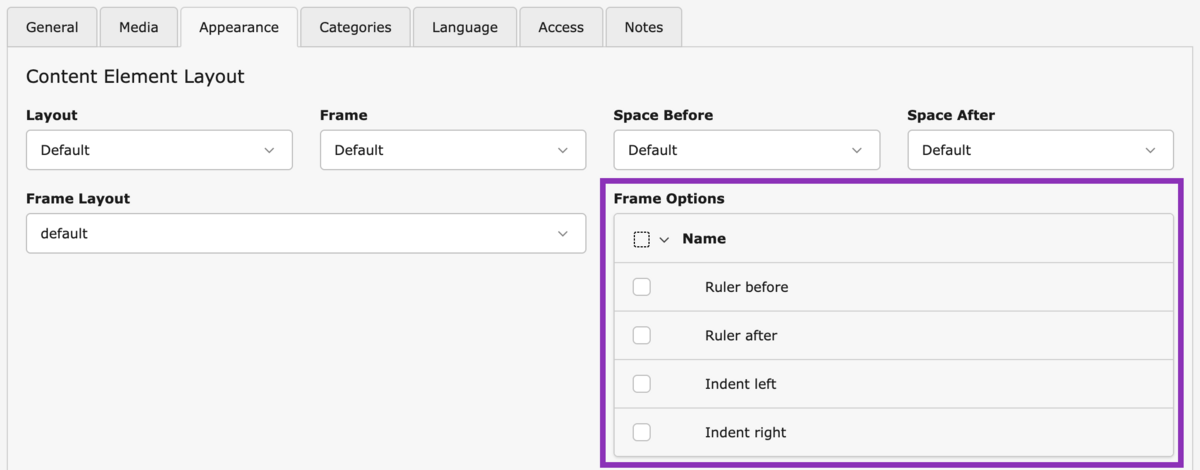
d) New features added through upgrades are already included in the project (or are not needed)
With each new version of the Bootstrap Package, new features are added. In some cases, TYPO3 Core options are replaced with custom solutions.
The frame classes “Ruler before,” “Ruler after,” “Indent left,” etc., can only be selected from a select field in the TYPO3 core—they are mutually exclusive. The Bootstrap package replaces and migrates these to a checkbox list called “Frame options,” which allows the options to be combined.
Sounds useful, right? However, these are exactly the options I disable first in a new TYPO3 installation: In a responsive website, elements rarely need to be indented. Dividing content by horizontal lines is not used on every website and can be achieved in other ways.
Instead, we provide options to display a content element either within the page layout or at full width.
Here are two examples where the rendering of headings has been improved in the Bootstrap Package:
- A new select field in content elements allows you to make an H2 heading look like an H3 heading, for example. It preserves the heading's important semantic meaning while allowing the editor to customize its appearance independently.
- Selectable headings for child elements. For a long time, the individual elements of a Card Group or an Accordion had a fixed heading (H3 or H4) in the template. In most cases, however, this should depend on the preceding heading: An H2 should be followed by child elements using an H3. The "Items Header Type" select field is now available, allowing the editor to choose the heading level themselves.
What's annoying is that we had already added these very two features ourselves in client projects. And, in our view, we had implemented them even better:
- We also allow to select a paragraph as a header type. Editors can then make a line of text look like a heading. This keeps the page's heading structure clean.
- The Bootstrap Package's select field always offers options ranging from H2 to H5, which the editor must select correctly. In our implementation, we determine a default value based on the parent element's header type. The editor can select a custom value if needed. Using a ViewHelper, we read both heading fields (parent element and child elements) and determine the final value. In case cards, for example, should not use a real HTML heading, we also allow selecting a paragraph.
As a result of the upgrade, we suddenly had two solutions for the same features. And we had to remove the duplicates from the Bootstrap package.
A software project like the Bootstrap Package must be allowed to evolve. Meanwhile, client projects must remain stable: when software components are upgraded, the output and behavior should not change significantly. We add new features to a website when the client has a need for them.
e) Our expectations were not met
“We get a fully functional website with little effort!”
In reality, we adapt many elements of the website to meet the client’s specific needs. The main navigation, in particular—a central element of every website—is almost always tailored to the individual project requirements.
In the end, little more than the basic structure of the original page template from the Bootstrap Package remains.
“We get ready-made content elements with very little effort!”
The Bootstrap package includes 24 content elements. Only a few can be provided to the client without customization. They require CI-compliant styling, additional fields, and functionality. Besides, no client ever uses the entire range of content elements.
“We’re taking advantage of the new features in the Bootstrap Package!"
Improved accessibility? We’ve already implemented that.
Variable headings? Likewise, see d).
New fields and options for even more flexible rendering of elements? In existing projects, these tend to create extra work to keep the status quo.
“A new website is up and running faster!”
I would not subscribe to that statement either. Depending on the circumstances.
The medium- to long-term issues mentioned are weighed against the initial setup.
Replacing the Bootstrap Package
So we have plenty of reasons not to use the Bootstrap Package as a whole. However, the components we actively use are well-designed and convenient.
We will migrate these to our sitepackage.
As part of this process, we clean up both the configurations and the templates. Many settings and partials are not needed in the project.
Certain existing TSconfig overrides can be moved to the TCA, and unused fields and options are removed from there.
Afterward, we can adapt the migrated components to the current TYPO3 API. Although the Bootstrap Package incorporates many best practices, supporting two TYPO3 versions in parallel means that new features can only be implemented there with a delay. This applies to Site Sets and the PAGEVIEW object, as well as to the registration of content elements in the TCA.
Benefits of migration
- Focus on essential functionality
- Less overrides
- Streamlined code
- Improved maintainability
- Fewer dependencies
- Earlier adoption of the latest API
Closing words
The Bootstrap Package stays valuable for us and will, of course, remain important for the TYPO3 project. It serves as both a showcase and a proof of concept for what’s possible and how to achieve it, as a template from which we can learn a great deal, and as a ready-to-use solution for projects that don’t require a high degree of customization.
However, when setting up our websites in the future, we will rely on our sitepackage as a single source of truth.
Please feel free to share this article.
Comments
No comments yet.