
TYPO3, n8n and Odoo: Automating license requests for SEGGER in CRM and helpdesk
How can requests submitted through a TYPO3 form be passed directly to a CRM and helpdesk? For SEGGER, we connected TYPO3 to Odoo using n8n. The workflow matches contacts, creates helpdesk tickets and categorizes incoming license requests. With around 130–140 requests per month, this eliminates manual data transfer and gives the support team more time to handle the requests themselves.

| Client | SEGGER Microcontroller GmbH |
|---|---|
Project duration | 2026 |
The starting point: license requests by email
Developers and companies worldwide request licenses from SEGGER for tools such as Ozone and Embedded Studio. Previously, these requests reached the support team by email. The team had to review each message, extract the relevant information and manually initiate the next steps. There was no direct connection to a CRM.
The goal was to transfer website form submissions as structured data and link each request to the correct contact.
Connecting TYPO3 and n8n to automate processes
TYPO3 continues to handle license requests on the website. Once the form is submitted, it passes the data to n8n via webhook. The automation platform coordinates the processing steps and connects to Odoo’s contact management and helpdesk through the Odoo API. The result is a CRM integration that works without modifying the TYPO3 or Odoo core.
The integration goes beyond forwarding form data: the workflow checks for existing contacts, adds the required information and creates a ticket linked to the correct contact.
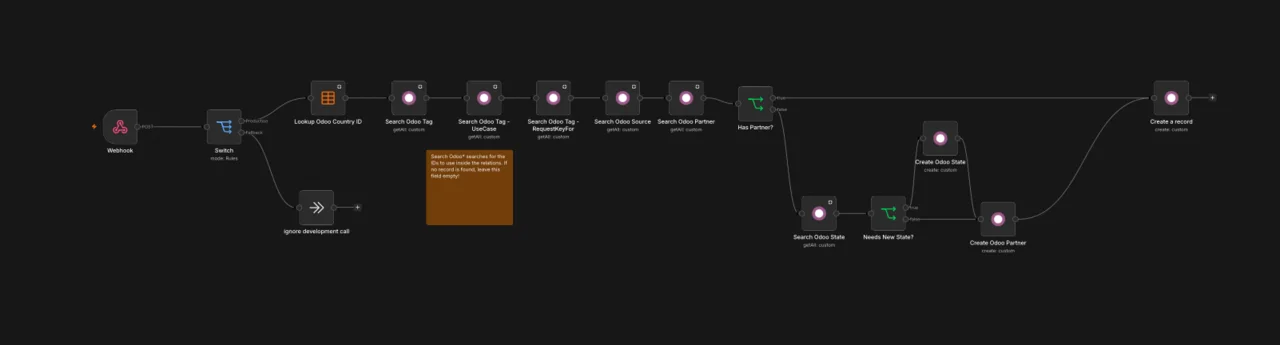
Automating TYPO3 forms with n8n: From submission to Odoo ticket
The automation handles three key tasks:
- Finding or creating contacts: The workflow matches submitted details to existing contacts in Odoo or creates new contacts using the address data provided.
- Creating and linking tickets: Every license request becomes a helpdesk ticket linked to the correct contact. Replies go straight to the requester instead of a shared technical mailbox.
- Categorizing requests: The selected product and intended use determine how each request is categorized and tagged, giving the support team the information it needs at a glance.
To support international addresses, we developed a dedicated TYPO3 extension. It adds a country-dependent state or province selection to the form, aligned with the corresponding records in Odoo. If a required state or province is missing in Odoo, the workflow adds it automatically.
Monitoring the automated workflow
Test submissions are kept separate from real license requests so that development data never ends up in the production system. Sentry, an error tracking tool, monitors the automated workflow and alerts the team to processing errors so it can respond promptly. Our monitoring also keeps an eye on ongoing operations.
The result: less manual work for support
Around 130 to 140 license requests per month now arrive in the Odoo Helpdesk as structured tickets linked to the correct contacts. With no manual data transfer required, the support team can start handling requests straight away.